

May 1997 • Volume 7 • Number 5
MINITAB
Release 11 for Windows Quality Control Analysis Software
By Steven A. Melnyk
In this month's column, we turn our attention to a category of product that we have not looked at in a long time — software for quality control analysis. This category of software has increased in importance greatly over the last 10 years. As a result of the introduction and acceptance of total quality management (TQM), there has been greater emphasis on the tools of TQM and quality assurances — tools and procedures such as run charts and Cpk. Increasingly, managers are expected to identify opportunities for improvements by relying on design of experiments. As a result, this demand for statistical tools has been responded to by several major statistical software systems such as SYSTAT and MINITAB. What these packages offer is not only a comprehensive set of quality control procedures, but also additional basic and sophisticated statistical procedures ranging from descriptive statistics such as means and standard deviations to more complicated procedures such as survival analysis and structural equation modeling. As a result, they offer a rich and diverse set of capabilities.
In this month's review, we focus our attention on MINITAB Release 11 from Minitab Inc. of State College, Pa. This is the latest reincarnation of one of the oldest statistical packages on the market. Originally designed primarily as a teaching tool, MINITAB has gone through numerous revisions and upgrades. It has moved beyond being a somewhat limited statistical package to being a full-featured package designed for use in many manufacturing operating environments.
Before turning to the review, please note that if you would like to contact me, you can do so by either phone or pager. However you decide to contact me, I look forward to hearing from you.
MINITAB is a veteran in the statistics field. Many university students were first introduced to computer-based statistics by means of MINITAB. It is one of the original microcomputer packages. From its modest beginnings as a mainframe application, MINITAB has grown into a package that is used in Windows 3.1, Windows 95 and Windows NT operating environments. It has become a very robust package which has kept up with the times through its ability to continuously evolve. While MINITAB is a full-featured statistics product, we will focus on its abilities in the quality control area.
As a quality control package, MINITAB offers nearly all of the capabilities and procedures that most users would expect to see in such a package. These include: Quality Planning Tools (Run chart, Pareto Chart, a very limited Cause-and-Effect diagram); Measurement Systems Analysis (Gage R&R Study — ANOVA method; Gage R&R Study — Xbar and R Method; Gage Run Chart; Gage Linearity Study); Variables Control Charts (Xbar chart; R chart, S chart, Xbar-R Chart, Xbar-S chart; I Chart (chart of individual observations), Moving Range (MR) Chart, I-MR chart, EWMA (Exponentially Weighted Moving Averages) chart, Moving Average Chart, CUSUM Chart, Zone Chart, Z-MR chart); Attributes Control Charts (P chart, NP chart, and various control charts for defects (e.g., C Chart, U Chart); Process Capabilities (Capability Analysis, Capability Sixpack); Design of Experiments; and Reliability and Survival Analysis.
MINITAB offers these capabilities within a regular statistics packages. What is nice about the manner in which these features are implemented is that they are implemented as an integral element of the entire statistics package and not as an add-on.
Under Windows, the MINITAB operating environment consists of a series of windows. These windows are used to control or manage the entering of data or commands. Data is stored and displayed using a familiar spreadsheet paradigm. The default limit on the size of the database is set at 100,000 cells, which roughly translates to a spreadsheet containing about 1,000 rows and 100 columns. Commands can be entered directly or by means of the dialog boxes and drop-down menus. Switching between the various windows can be done either by clicking on the desired windows or using control-key combinations. In addition, MINITAB is able to retrieve and edit the last command.
In commenting on MINITAB, I will be comparing the performance and
features of this package with those of some of its competitors
(specifically JMP and Statgraphics).
Product Performance
The performance of a package such as MINITAB can be evaluated on a
number of different dimensions. It can be assessed in terms of the
breadth of features offered. On this dimension, MINITAB offers the
user little to complain about. Nearly every statistical feature and
tool needed for quality control is easily and quickly available.
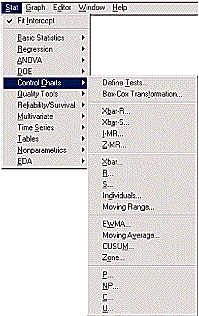
These features are implemented within the Stat menu as part of either
the Quality Tools or the Control Charts submenus (see Figure 1).
|
|
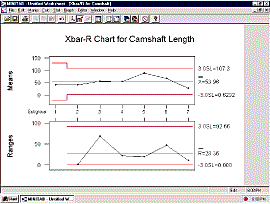
Some of these features, such as the Design of Experiment and Process Capability Tools, are particularly strong and well implemented. Others, such as the Cause-and-Effect diagram, are minimal in nature. In the case of the Cause-and-Effect tool, the user would be better off using a package such as VISIO, since the MINITAB version is limited to one sub-factor off of each main factor (e.g., you can only place branches off of each major category). It is also not as intuitive as other packages. In addition, MINITAB, while rich in graphics, offers users somewhat limited graphics. There are numerous graphic types available. They are easily generated (e.g., see Figure 2 for an example of an Xbar-R chart). The user is given numerous options determining the amount of control or detail present in the graphs. However, they are not as well linked to the underlying data set as one would like. For example, when going through and doing a typical control chart analysis using the Xbar-R Chart, the user finds several points which are out-of-control (i.e., beyond the bounds). It would be useful to "click" on those points and be returned to the underlying data set. There, the user could review the conditions surrounding these points. With the current version of MINITAB, this is not possible. Clicking on points on graphs only opens up the graph editing tools. Furthermore, because MINITAB is so powerful, there are several prices to be paid. First, this is not a package for people who have very limited or no exposure to quality control tools. You cannot learn how to carry out quality control tests using the package and the manuals that came with it. Rather, this program expects that the users have a certain level of familiarity with quality control tools. The implicit position of the package is that if you understand the tools, MINITAB will give you the operating environment in which to use them. |
|
Figure 1
|
A second dimension is that of speed. Before evaluating speed, it should be noted that this package was evaluated in two work environments. The first was a 90 MHz Pentium machine with 16 MB of RAM and a 540 MB hard disk, running Windows for Workgroup 3.11. The second was a 90 MHz Pentium with 24 MB of RAM, a 1.6 GB hard disk and operating under Windows 95.
|
On the dimension of speed, which is somewhat subjective, MINITAB seems to be fairly fast. However, the speed offered by MINITAB is influenced apparently by two features — the size of the database and amount of graphics work required. When working through the various tutorials, there were occasions (especially when working through the process control and design of experiment modules) where the program completed its calculations and seemed to be waiting for various calculations (typically the generation of graphs) to be completed. It was during these times that the program displayed a message informing the user to work while the macro finished executing. This seemed to indicate that many of the quality control features were implemented using the very powerful and complete macro language offered by MINITAB (and described in great detail within the Reference Manual). |
|
|
Figure 2 |
Given that packages such as MINITAB must be able to share information with other packages (typically spreadsheets), import and export capabilities are critical. Here, MINITAB does a commendable job. It is able to import data from packages such as Excel, Quattro Pro, Lotus 1-2-3, Symphony and Dbase. I was able to import an Excel spreadsheet easily and find all the information there. However, if there is one limitation here, it is a minor one. It would be nice to see MINITAB also offer import/export with other statistics packages such as SPSS, SYSTAT or STATA.
Overall, the program performed fairly well. It was fast and
complete. However, compared to other statistics packages such as
STATA, it was not as fast. And compared to packages such as SYSTAT,
it offered less control over the types of graphs produced.
Ease of Installation and Use
As previously noted, MINITAB was installed under two different
environments — Windows for Workgroup 3.11 and Windows 95. Except
for a minor problem under Win 3.11, the installations were done
without much trouble. MINITAB provides a setup program which is then
run to install MINITAB. The only problem occurred when installing
MINITAB on the Windows 3.11 machine. After the initial setup was
completed, the program was then started. Unfortunately, the program
generated an error message indicating that the version of Win 32s was
an old version. Resolving this program required installing the
version of Win 32s that came with the package. After this was
completed, the setup program indicated that Windows would have to be
restarted so that the new conditions could take effect. However,
doing so generated numerous error messages and conditions. What was
required in the end was to exit Windows and turn the computer off
entirely and then restart it. Once this was done, there were no other
errors noted.
If possible, install this program as a Windows 95 program. The operating environment is far more stable; and under Windows 95, MINITAB gives the user access to tools and status bars. What is nice about MINITAB is that this functionality is maintained across the different platforms.
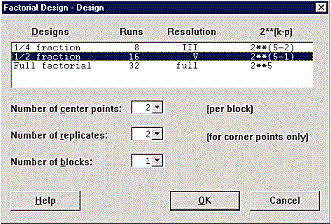
After the program is installed, the next step is to assess the ease of use. There are several factors which help make MINITAB a relatively simple program to use. First, there is the extensive use of menus. Everything is organized into menus or submenus. At times, this seemed to be overdone, as there appeared to be submenus to submenus. Second, when most procedures are initiated, the user is typically presented with a dialog box (see Figure 3). All that has to be done is to fill in the blanks. Third, help is available in many forms. There is extensive on-line help available. In addition, the manuals provided with the product are comprehensive in regard to how the program is to be run. They are also well indexed, come with a table of contents, and are nicely organized around major theme areas. For example, all of the information for doing the various quality control procedures can be found in either Part II (Quality Control) or Part III (Design of Experiments) of the Reference Manual.
|
|
Fourth, there is the tutorial. MINITAB includes a fairly comprehensive manual designed to help the user learn about the various tools of MINITAB as well as its operation. In general, these tutorials did a good job of showing the user how to use the package and enter data. The only minor problems with the tutorials were the instances where the MINITAB display differed from what the manual showed. At worse, this was distracting. It could be confusing to someone who is not at all familiar with computers.
|
|
Figure 3 |
One thing that could really improve the overall ease of use of this package would be the use of a MINITAB version of a tool such as Wizards or Coaches. Wizards are tools found within most Microsoft products (while Coaches are found within the WordPerfect suite of products). They are designed to help users with tasks considered to be particularly difficult (e.g., setting up tables or doing a mail merge). Such a feature would be very useful to MINITAB. It could help users with tasks such as doing a design of experiments or with the interpretation of control tables (as well as helping the users decide how to best act on them). Without such software coaches, the effectiveness of MINITAB as a quality control tool is ultimately determined not by the package, but by the expertise of the user.
On a personal level, I found that, even after completing all of
the tutorials and working with package, I did not feel that
comfortable with the package. It was not that intuitive to me. This
came as a surprise, since I have used packages such as STATA, SYSTAT,
EQS, GAUSS, and SPSS (to name a few). I find that I can pick up these
packages even after I have been away from them for a while. Such was
not the case with MINITAB. However, there is evidence to indicate
that this problem might be unique to me. In talking over MINITAB with
various students at Michigan State University (where MINITAB is used
extensively within the MBA program to introduce students to the use
of computers in statistical analysis), many students informed me that
they found MINITAB very easy to use.
Technical Support
The technical support offered by this company was not extensively
sampled. The homepage maintained by MINITAB was accessed and found to
be very helpful (especially its FAQ or Frequently Asked Questions
section). In addition, the manuals, while limited, were fairly
concise, well-written and informative. The package was also fairly
stable. The only times that I was able to get the package to crash
was when controls were executed out of sequence (in which I got an
illegal operation message and the product shut down).
MINITAB offers a wide range of support options. These include the Internet homepage, and telephone and fax support.
Overall, the technical support was judged as good.
Other Features
Before leaving a review of this program, there is one feature which
bears some comment. MINITAB is a fairly flexible program. This is
due, in part, to the presence of a comprehensive and well-documented
macro language offered by MINITAB. This capability means that users
can develop and implement their own routines. While not as fast as
the programming language offered by STATA, the macro language is very
extensive and worth reviewing.
Complementing the macro language is the exec feature. Execs are stored commands that can be used over and over again.
These features should appeal to a user who wants to develop
software support for a very focused quality control application.
Overall Assessment
This is a good package which makes the right types of compromises. It
offers users the following features:
- a package that runs on a number of different platforms;
- extensive set of quality control features;
- excellent complementing statistical capabilities;
- decent speeds, good graphics capabilities;
- a stable, mature package and operating environment; and
- flexibility through its macro language and exec capabilities.
However, there are certain things that MINITAB might consider when revising its package, namely:
- cleaning up some of the minor errors in the tutorials;
- introducing MINITAB wizards to help users better apply the capabilities present within MINITAB;
- clean up and simplify the menu system by rearranging some of the menus (to eliminate the extensive cascading of menus); and
- linking the graphs to the data set so that by clicking on a point on the graph, we are placed at the appropriate point in the data set.
Overall, this is a good product. It has hidden its age well. However, with some minor modifications, it could be an excellent product. Nevertheless, for most settings, it offers access to nearly all of the quality control procedures and tools that you might need.
Product Summary
|
MINITAB Release 11 | |
|
Type of Product: |
Statistical Package/Quality Control |
|
Software Vendor: |
3081 Enterprise Drive, State College, PA 16801-3008 |
|
E-Mail: | |