
April 1996 € Volume 6 € Number 4
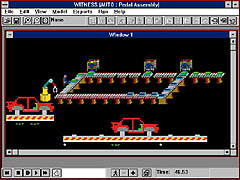
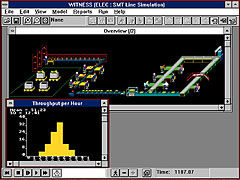
The software includes predefined elements -- parts, fluids, machines,
buffers (storage), labor, AGVs, conveyors, tanks, pipes, processors (as
shown in Figure 2) -- and a powerful BASIC-like language that can be structured
to model any type of manufacturing situation. It can be used for advanced
planning for new lines, entire plants or plant improvements for any type
of product. The predefined elements are general enough in nature that users
can also use them for non-manufacturing environments such as services (paperwork
flow, people-based operations, etc.) and facilities used by people, such
as cafeterias. The powerful graphical interface displays actions and is
important in model development and debugging.
Program performance
WITNESS was run on a 90 MHz Pentium machine with 16 MB of RAM and local
bus SVGA. It can run on IBM-compatible Windows machines with 386 and 486
processors. The primary difference, as would be expected, is the development
and run times for models -- faster machines provide faster performance.
Although the speed of the processor is the primary factor in model performance,
additional benefit can be derived from increased memory. In most instances,
however, 16 MB of RAM is more than enough.
There is a second critical component to program performance -- the time
and effort needed to build a model. In the case of WITNESS, the time needed
is relatively short given the structure and process that is present. There
are three stages in building a WITNESS model. The process being modeled
is first described by defining a series of elements. These elements can
be viewed as the building blocks of the model and enable the user to specify
the activities, equipment, operations, products, people etc., inherent in
the process. The second stage is to display these elements on the screen
to create a visual layout of the process. The final stage is to detail or
describe these elements by filling out Detail Forms that allow the user
to specify exactly how the elements operate (for example, process times,
downtime, shifts, resource requirements, etc.). To speed up this process,
the user can create models from pre-existing templates (referred to as Designer
Elements). These Designer Elements already have their display and detail
characteristics pre-set so that models are built by pointing and clicking.
The user selects elements from the template and adds them to the model,
thereby defining, displaying and detailing the process in one step.
Documentation
The manuals are thorough, well-organized and well-written documents with
clear written and graphical examples on the defining, detailing, and display
of all type of elements available to the user for the development and analysis
of basic models. All manuals have indexes. On-line help is also included.
In the case of the Windows package, the software contains a complete context-sensitive
hypertext help system as found in other Windows-based tools.
There are five manuals. The Installation Guide covers system components,
hardware and software requirements, software installation and security device
installation (including PC network security device).
Introduction to WITNESS explains how to use WITNESS, introduces WITNESS
elements, describes basic model building menu options and action bars and
rules, and provides examples of models.
The first four chapters of Creating WITNESS Models describes discrete modeling
elements, continuous processing elements, logical modeling elements and
graphical modeling elements. Chapters five through nine describe how to
use rules for moving elements, how to introduce variability in a model,
how to specify element detail parameters, how to use the programming language,
and predefined functions that are built into WITNESS. Chapter 10 describes
graphical enhancement features, including CAD drawings, and Chapter 11 describes
how to make changes to default display and detail options.
Using WITNESS Models describes: how to select elements for reporting; how
to generate reports and save files; how to derive useful information when
running a model; how to generate statistical reports; how to conduct a simulation
project; how to conduct experiments; how to use WITNESS XA (a program which
displays experimental data and performs statistical analyses upon it); how
to output data to DIF files; and how WITNESS can be controlled by other
software packages by using OLE2 automation.
Application Notes Provides information on the new features provided in Version
7.0.
The manuals provide a good understanding of the basic structure and use
of the software, but provide an elementary understanding of building and
running simulation models. The manuals, while intended to be primarily a
reference source (and targeted at experienced users) can be used fairly
effectively as a learning tool by the novice user. However, to realize the
full potential of the software, it is recommended that the user take a course
in WITNESS offered by a trained person.
Installation and learning
Installation of the software is straightforward and required approximately
10 minutes on the test computer. WITNESS allows the user to select the subdirectory
where the software will reside.
Although a review of the manual contents listed above may lead a reader
to sense this is a complicated package and difficult to learn, this reviewer
has found that, like a spreadsheet such as Lotus 1-2-3, where a novice can
do tasks as simple as summing a column of number and a sophisticated user
can write complicated linked sheets with powerful macros, WITNESS can offer
a user the same levels of use. Therefore, a user can, with initial training,
find useful results, and with further use and reading of the manual and
examples, build more complete models of more complicated systems.
WITNESS's approach to model building -- defining and displaying elements,
and then detailing the behavior of these elements via forms -- enables models
to be built very quickly. This also permits more complex models to be built,
largely through the concept of "Actions" on the detail of each
element. These Actions represent a simple, BASIC-like programming language
that enables the user to describe key logic at each event in the model (for
example, at the start or finish of an operation, on a breakdown, etc.).
Actions enable you to model the calculations and logic that underpin decisions
in the real-life process and are further supplemented by a series of built-in
functions that provide critical information on the state of your model (e.g.,
the number of parts currently in a given queue, the status of a given machine).
These aspects provide a very rich set of features that enable the most complex
of processes to be modeled.
Ease of use
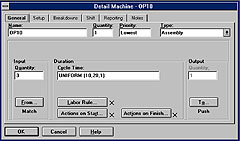
WITNESS is designed around fourth-generation software, which greatly simplifies
the building of the model and provides programming language that can correct
many programming errors and provides many short cuts for developing the
model details (see Figure 3).
The reader should not assume that WITNESS, or any other general simulation
software, will make all simulation projects easy. Complicated situations
will require more complicated models. What is important is that the software
have the capability and capacity to meet these needs.
Technical support
AT&T Istel provides technical support from its Cleveland office. For
off hours they have a bulletin board where users can post problems and receive
answers back. AT&T Istel also has several offices across the nation
that can sometimes provide technical support.
AT&T Istel also supports an active users group and publishes a quarterly
newsletter that offers tips and model samples from users and Istel technical
support personnel. The newsletter is also a source of news on updates, technical
modeling tips and customer application stories from around the world.
Best features
The extensive set of elements (e.g., parts, machines, buffers, functions,
AGVs, etc.) and the many ways they can be configured, the programming language,
the ability to access external files, the linked graphics, the many input
and output rules for parts and fluids, methods of controlling the model,
and documentation features allow the user to create almost any type of model
quickly and accurately. Because WITNESS was developed in an industrial environment
by those needing to answer questions specific to manufacturing and related
activities, it is well oriented to meeting the need of many readers of this
magazine.
A second useful feature of the package is that it is a multiple-platform
package. That is, a model developed in a PC environment can be easily exported
to other environments. This ensures that the resulting models can be widely
used.
An undocumented feature is that WITNESS can execute C programs from within
the model, allowing a user to have access to more extensive file access
and functions that cannot be executed with the imbedded functions and arithmetic
operators.
Shortcomings
The price of this package may cause some prospective purchasers to hesitate.
Compared to competing packages such as ProModel, this package is premium
priced.
The very strengths outlined above can be shortcomings for users looking
for a "canned" package to provide them with quicker and less expensive
(and sometimes not less expensive), answers, even if less accurate. As pointed
out above, WITNESS can be used relatively easily from the beginning for
simple models. But to fully utilize the capability of the system for sophisticated
models, the user will be required to understand its many features, and this
will require a commitment in time and effort. That is, the onus is on the
user to develop and test models and to collect the data required by the
models.
Overall evaluation
WITNESS is a fully featured simulation system that can meet the most demanding
requirements of manufacturing, service, and other environments in which
rapid, accurate solutions are sought.
Ken Self is a systems integration project manager with Industrial Design
Corporation (IDC) in Portland, Ore. IDC is an engineering and architectural
firm specializing in the design and construction of high tech microelectronics
factories and also does work in the food and discrete parts manufacturing
industries. Ken has a bachelor of science degree in industrial engineering
from Stanford University and an MBA, specializing in simulation methods
and theory, from the University of Denver.
| Product: | WITNESS, Release 7.0 |
|---|---|
| Type of product: | Dynamic, discrete simulation modeling software |
| Vendor: | AT&T Istel Visual Interactive
Systems, Inc. 25800 Science Park Drive Cleveland, OH 44122 |