
December 1996 € Volume 6 € Number 12
December 1996 € Volume 6 € Number 12
A recent Information Week cover story blared, "Client/Server: Can It Be Saved?" The article proclaimed that the architecture is a huge disappointment, more expensive and complicated than mainframes. According to Yankee Research Notes, mainframe sales will be up 61 percent over the next three years, and consumers are deferring client-server.
Meanwhile, the Hurwitz Consulting Group insists that contrary to rumors, client-server computing is not dead and within two years will become, along with the Internet, the dominant business application architecture.
IBM's Lou Gerstner says that client-server is not a full-blown phase of computing; it's the leading edge of the next phase&emdash;something that IBM is calling network centric computing&emdash;where the major computing occurs on various nodes around the network. Those more aligned with the Microsoft worldview are saying all the power is going to be on the desktop with a small server to keep desktops talking to each other.
Then there are those who believe inexpensive network computers (NCs) are going to be ubiquitous&emdash;yet another view of what your future IT environment might be.
If this isn't enough to think about, you have to consider the Internet. It's been said that a business not on the Internet is like a business without a fax machine. Both IBM and Microsoft are fostering electronic commerce, anticipating a day when cybershopping will be commonplace. But quite a few web sites say, "You will be able to order online as soon as we are satisfied that we can guarantee you a safe, secure environment." The kicker is that no one can predict exactly when this "safe, secure environment" will come about.
This article will not attempt to make sense of these opposing
viewpoints, nor will it try to predict the platform of choice for
manufacturing in the next decade. Rather, this article offers an
intelligent strategy for utilizing new technology&emdash;one that
replaces the 'big bang," enterprisewide reengineering approach being
used by many companies today and one in which the "system du jour"
won't matter because it will be easy to integrate new
technologies.
Putting Business First
It's easy to get excited about the promise of new technologies
(especially when your competitors are spending heavily on
enterprisewide reengineering efforts). However,
manufacturers&emdash;like all businesses&emdash;must stay focused on
the needs of the business rather than on the technology that runs it.
Otherwise, you can fall into the trap of implementing software that
requires the business to tailor itself to work with the software,
when it should be the other way around. In any information management
strategy, the focal points should be customers, products, delivery
schedules and pricing; not (while clearly very important!) hardware,
databases and servers platforms.
The key to putting business first is to have a technical foundation that allows the organization to adopt new technologies quickly. In far too many cases, by the time software solutions are implemented, the needs of customers or the competitive landscape has changed. Technologies are evolving so quickly that by the time one is implemented, a newer and better version comes along&emdash;the classic dilemma of the technology lifecycle versus the development cycle.
Putting business first also requires empowerment at the desktop, so that managers can maximize technology without the intervention of IS staff.
In the same way that you don't need to know how fuel injection works to drive your Ford Ranger pick-up, a shop floor manager shouldn't need to know where data resides or how objects work.
Finally, how enabled are you to run your shop floor or manage your
inventory into the next decade? Technology must be adaptable to the
changing needs of business&emdash;without organizations spending time
and money reengineering programming code or bringing operations to a
grinding halt while systems are upgraded.
Consider This
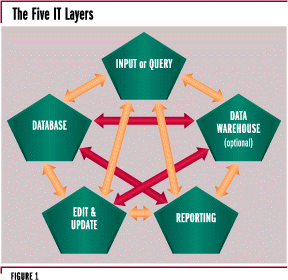
Previously, the common model for IT architectures consisted of three
layers:
However, manufacturing companies today also need to be concerned about the reporting layer and the data warehousing layer.
Of these five layers, the data warehousing tends to be the most complex. The reality is you don't need to have all your general journal records in your database. You need to have your current and active ones, but you might want to move others into a data warehouse. You don't need access to all records all of the time. With sales figures, for instance, you might want to have the current year, but you don't necessarily need your last four or five years right at your fingertips. You can warehouse that data and bring it back for use at a later time.
The reporting layer is tied to the input or query function, because while there are many reporting tools out there, why should they be any different than your input or query tool?
Now, how feasible is it for you to take your existing applications today and port them from one hardware platform to another? It is possible to take your database layer, data warehousing layer, reporting layer and application layer, and move them around on a number of different hardware platforms at any time. As difficult as it sounds, your approach to your business functionality should be isolated from your IT functionality. And it can be. The tool that isolates business from technology should handle any changes that come along on the technology side. An industrial strength solution can enable different technology at the same time that it works with a number of presentation formats on the front end.
It turns out that the five "easy" data distribution layers have
many different relationships to various applications. They have to
integrate in a number of different ways, and that brings up the
subject of tiered architectures.
How Many Tiers are Enough?
A one-tier client has no server. All five layers can exist together
on a so-called fat client. One-tier technology definitely has its
place. A salesperson with a laptop on the road is, in essence, a
one-tier client if everything necessary to do the job is on the
laptop. But if the salesperson plugs into the telephone in a hotel
room and sends data back to the home office or downloads information,
a two-tier architecture or the traditional client-server model
immediately exists.
In the case of a three-tier model, it still doesn't matter whether
the information resides primarily on a server or a client. Tiers are
becoming passé because it really doesn't matter how many tiers
you have or where they are. Beyond tiers, what you really need is a
configurable network&emdash;the ability to link disparate machines
and platforms together in many locations and yet have a common
business technology flowing across everything.
What Goes Where?
ASTECH Solutions Inc. says that information technologies can be
assessed using eight criteria (see sidebar). Let's look at some
typical enterprise applications and compare them to these IT
assessment criteria to decide which architecture would best support
each application&emdash;a host-based or client-server system.
If you want to do a general ledger post, a host-based system works just fine. You need high availability; i.e., you have to be able to get to all your various databases. Efficiency is also high on a host-based system for routine, batch-oriented tasks like general ledger post. Performance is a wash from both host-based and client-server standpoints. Security is definitely an issue with general ledger; you don't want unauthorized persons to be able to get inside your chart of accounts and see your balance sheet statements. Ensuring security on a configurable network or client-server environment is more challenging than on a host-based system.
The general ledger system's usability would depend a great deal on user interface and design; perhaps client-server has the advantage here. Maintainability? Because you can't know exactly what's going on at the user's desktop, maintainability is definitely more complex on the client/server side. Interoperability is not too difficult on the host side if you stay within the same system; and on the client/server side everything is much easier if various applications conform to open systems standards. You don't have huge scalability issues because you don't typically have a lot of people accessing a database to run a general ledger post.
With sales order processing, however, a client/server or configurable network application is probably far more useful than a host-based system. It's easier to maintain. You can certainly scale up the number of users much quicker in a configurable network environment. Usability is also higher in configurable networks, because of the number of things sales order people want to do on their desktops. If I'm a customer service representative, my personal productivity is important, and so is finding new, better and faster ways to serve customers. Personal desktop systems support the kind of innovation required to excel in this area.
How about a good old-fashioned planning run? Most people who want to do a planning run nowadays say, "I need a lot of dedicated memory and resources, and I really have to be able to control the process, because once I start it, I have all these issues of availability and performance. I don't want other people getting in and out of those files during the process." So the vote here would definitely be for host-based processing.
Now suppose you've just done your DRP, MPS or MRP run. Let's say you're the planner, and you're working with that data. In this case, you don't want to be on the host machine, tied up with a huge database and all those other users who are also trying to access it. You want to bring data down to your desktop, work with it and analyze vendors, suppliers or machine centers. You can do that on a desktop much better than on a host-based system. When it comes to analysis, you're better off being in a configurable network with a powerful desktop system.
In an enterprise requirements planning system, there is what some people call the high level planning layer, and then there is the actual execution of that plan taking place on the shop floor (MES). Done on a grand scale, high level planning can be in months, weeks or days. Manufacturing execution systems are much more granular, dealing in shifts, hours and minutes, telling the operator what job to do next based on the information the planning system provides and comparing it with what's happening on the floor. Do you have the parts? Do you have the machines? Do you have the tools? Is the correct operator available? Are there maintenance issues? Quality issues? It makes more sense to have this information available on a terminal. If you're going to collect data on the number of hours that a person puts in making widgets, issue some material, or complete some work orders, a host-based system is the best answer.
Modern competition is based on your ability to respond to rapidly
changing business conditions and to economically enable best business
practices. To accomplish this, you must have coexistence among all
kinds of different architectures, platforms and hardware. The point
is that different architectures work better for different
applications.
Coexistence: A Modern Requirement
Coexistence puts business in control of technology by providing a
unified computing environment capable of supporting everything from
host-centric to client/server computing and beyond. Included are
"green screens" or "thin" clients&emdash;applications like shop floor
and data entry&emdash;as well as "fat" clients for users with expert
computing ability and data handling knowledge. Coexistence helps
avoid risk by having the same application enabled over several
environments. When you've appropriately set up a coexistent
architecture, it won't matter where the application resides; it's
going to run pretty much the same. It may look different, but it's
going to run the same.
A coexisting architecture allows you to have staff using an application on a green screen and then, as they become more capable of dealing with desktop environments, move them to a new technology. At the same time, others in your business might be doing work in the same environment on far more sophisticated workstations. Coexistence simplifies the integration of legacy systems with third-party vendors as well as your primary software vendors, moving applications around and integrating them with fresh technology when necessary.
It's not good enough anymore just to be able to have a server in one location and a client in another. You have to be able to move both data and logic around to take care of the differing loads on today's information systems. If a network gets overloaded, you may want to move some of its applications to a different server to improve performance. A configurable network provides a way of offloading some of the higher priority jobs to alternative facilities.
Your business probably has several applications today that have been around your particular facility for some time. You know those applications work. You need to enable those applications to run on several platforms, switching from one platform to another at different times depending on the system load. Doing so provides the best economic value because you're not investing in faddish new solutions.
It's a logical pathway, and it's the least revolutionary, giving you the ability to migrate applications at the pace that makes sense for your business. You shouldn't have to tear out everything you've done and start all over with a whole new system.
|
Information Technology Strategy: The Ground Rules ASTECH Solutions, a consulting organization comprising a network of professional, independent consultants spanning North America and Europe, has identified eight critical criteria you need to consider when evaluating an information technology strategy:
|
For more information about this article, input the number 1
in the appropriate
place on the
December
Reader Service Form