

January 1997 € Volume 7 € Number 1
ISO-Pro For Windows
A Toolkit for ISO 9000 Certification
By Karl M. Kapp
ISO 9000 defines a set of international accepted standards for business quality adopted in 1987 by the International Organization for Standards (ISO). The ISO 9000 standards identify activities and traits that govern the acceptability of products and the effective control of a company's processes. ISO 9000 certification assures customers that a firm has designed and managed its processes to assure the consistent delivery of a quality product.
Becoming ISO certified is not an easy undertaking. It requires extensive analysis and documentation of existing processes in some 20 specific areas (as they pertain to a company's quality program). It also requires a quality audit by a qualified external auditor. Because of these and other factors, firms need help with the implementation of the ISO standards. This month, guest reviewer Karl M. Kapp takes a look at iSO-Pro for Windows, a new toolkit for organizations seeking to meet the challenge of ISO 9000 certification.
Steve Melnyk
Software Editor
iSO-Pro for Windows assists small and mid-sized manufacturing companies with the ISO 9000 registration process. Using iSO-Pro, a company can learn about ISO 9000, compare their current quality position to the standard, track important project milestone dates and develop materials to support ISO compliance. iSO-Pro contains information, tips and advice typically supplied by consultants.
The software is a combination learning tool, analysis program,
documentation template, project manager and diagramming tool. The
five modules within iSO-Pro support companies at different levels in
the registration process -- from an organization needing basic
information on what is ISO 9000 to registered companies conducting
internal audits to assure continuing compliance.
Program performance
Installation and tests were run on an IBM-compatible system (100
MHz Pentium PC, 16MB RAM, SVGA). This setup was more than adequate
for running the package which took eight minutes to install.
Execution of the package was fast and graphics, templates and text
all appear quickly. I recommend loading the software on a laptop. A
laptop provides quick access to the iSO-Pro project management tools
during meetings and is easy to carry from department to department
while conducting an assessment of your organization.
iSO-Pro contains a variety of paths into the various functions of the software, but the route suggested in the manual is the one I chose. The predetermined path was chosen because, according to the manual, it is important that the user enters the system and tours through in the correct sequence. This ensures that as each module is accessed, the information required for that module will already have been installed and understood.
The Seminar module of iSO-Pro contains background information on ISO 9000, self-paced training, identification of which ISO model fits your company and other educational information. You can click through a series of cascading screens to learn about ISO 9000. Everything from anticipated costs, to tricks for finding a good consultant, to the key functions required for ISO 9000 success are available. It is intermediate to advanced instruction designed to teach you the "ins and outs" of ISO 9000 standards.
Next, you will want to go to the Configure module (see Figure 1). You will be asked to enter basic information used throughout the other modules of the product. You will set up your document numbering system to identify the documents you create later in the product. This standard, pre-established numbering system is extremely helpful since documentation and revision tracking is a large part of the ISO 9000 process.
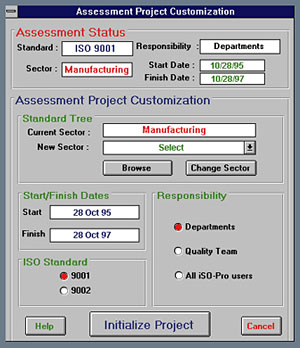
Figure 1: The Configure module compiles product data used in all
subsequent modules.
You will also be asked to utilize a flow chart tool to diagram an organizational chart of your company (see Figure 2). The chart is used as a template for document tracking and diagramming.
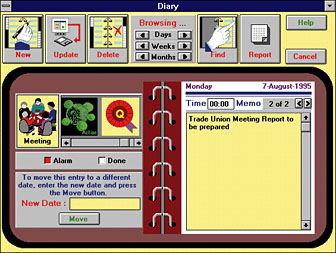
Figure 2: The Implement module's daily planner interface helps
user track key events.
iSO-Pro also asks for a list of people involved in the project. Once entered, the people named can be associated with a specific project task in the ASSESSMENT module.
The Assessment module is the heart of the product. It encourages an objective assessment of your organization by providing a template of ISO 9000 requirements broken down by section, sub-section and question. This allows you to compare existing company practices and procedures against the requirements of ISO 9000. The assessment questions contained in iSO-Pro are designed to be the type of questions asked by a third-party auditor, registrar or consultant during an evaluation of your organization.
Management Responsibility
- Is the Quality Policy relevant to the needs and expectations of your customers?
- Is the Quality Policy relevant to the overall business goals of your organization?
Contract Review
- When verbal orders are accepted, are requirements fully documented?
- Are all relevant documents reviewed by the appropriate staff prior to commencement of work?
Purchasing
- Do purchasing procedures ensure that the product conforms to the specified requirements?
- Does the organization maintain a list of approved suppliers and sub-contractors?
Process Control
- Do procedures specify suitable parameters and characteristics to be monitored in processing?
- Is equipment maintenance planned to ensure continuing process capability?
Non-conforming Product Control
- Do procedures exist to prevent non-conforming items from being used or installed accidentally?
- Are non-conformance reports used?
- Is the cause of non-conformance investigated and documented?
- Is the process corrected so as to prevent recurrence?
Training
- Do procedures ensure that personnel are sufficiently trained to perform the job function?
- Do documented procedures exist to identify and plan staff development?
A Color-Coded tree structure allows the user to navigate through the product and find exactly the section, sub-section or question he or she is looking for. Once a question is located, the assessor can judge the percent of compliance toward the specific question on a sliding thermometer scale of zero to a hundred. The system has an expert advice button which provides detailed information and advice for answering the assessment question.
When the percent of compliance is indicated, the next field is for entering the number of weeks until 100 percent compliance will be achieved. Once you have determined how long until compliance, you can assign a person to the specific task from the list of users entered in the Configure module then indicate if any corrective actions need to be initiated.
When the assessment is completed, the module provides Gantt charts, gap analysis instruments, workload profile reports and other tools for evaluating the progress made toward registration as well as tasks which still need to be completed. The graphing capability of the product is extensive and easy to use.
The Workshop portion of the product provides templates and advice on writing ISO compliant material from companies that are ISO 9000 registered. This module utilizes the numbering system established in the Configure module. Editing the templates and printing the resultant modifications is simple.
The product allows for the quick creation of a variety of documentation from a quality manual to the design of internal quality forms. iSO-Pro makes it even easier by allowing you to choose your favorite word processor in the Configure module. This is important because learning how to use a new word processor on top of trying to implement ISO 9000 within your organization is a headache you don't need.
The IMPLEMENT module tracks events necessary for the successful
implementation of ISO 9000. The planned completion dates entered in
the assessment module are tracked within the on-line calendar. The
calendar is graphically depicted as a day planner and a reminder
appears each time the project manager logs in asking if he or she
would like to view the list of scheduled events.
Documentation
A 10-chapter manual and a quick reference card are provided along
with six installation diskettes. The manual contains an ample number
of screen captures and explains both the functionality of the product
and the purpose behind each screen and report. The manual also serves
as a road map for setting up and using the product.
The manual does not contain an index and from time to time you will run into the "Queen's English" and a European date format since the product was written in Great Britain. The "foreign" language does not detract from any meaning but does cause one to pause occasionally whilst reviewing instructions.
The best feature of the on-line documentation is the eight tutorial sessions provided with the program. The tutorials are a slide show of the features of iSO-Pro with pop-up overlays explaining specific functions with major screens as backdrops. The tutorial is available as a separate icon and is also available from within the main product.
In addition to an on-line tutorial, iSO-Pro can be run in a
"tutorial" mode. This means that you can perform functions within a
pre-installed test company without being forced to configure iSO-Pro
prior to completely understanding how it works. This feature comes in
handy as an educational tool and provides examples for completing
information requested by the product.
Ease of Use
Anyone familiar with windows navigation will be able to move through
iSO-Pro easily. The typical conventions of buttons and underlined
text leading to additional text, information, or functionality are
used. The software has a quick start menu allowing direct access to
specific areas of interest to new users. The main menu displays a
grouping of planets with orbiting moons. If you are interested in a
specific area, click on the planet and sub-menus appear on the moons.
Click on the sub-menu (moon) of interest and the program takes you to
that area.
Support
The company that supplies iSO-Pro has two offices offering support.
One is in the United Kingdom and one is in New York. Both are
available by phone and fax. With the extensive help facilities and
the tutorial mode, I did not need much support with the product.
However, on the few occasions I called each office, the phone was
answered by a machine. I found fax correspondence to be the most
expeditious method of communication with support personnel.
Best features and shortcomings
The strength of the iSO-Pro product is that it provides access to
expert advice and guidance with a simple click of the mouse. It is
obvious that the software was written by individuals who have
experienced the trials and tribulations of bringing an organization
together to achieve ISO registration.
To gain maximum benefit from iSO-Pro, the user needs to have some
basic knowledge of ISO concepts. Anyone completely unfamiliar with
ISO standards will be a little lost. In addition, the European date
format can cause some initial frustration.
Overall Evaluation:
The system provides an excellent project management tool for any
manufacturing organization undertaking the long journey to ISO 9000
registration. iSO-Pro is easily accessible, contains a variety of
tools and expert advice for tracking progress toward compliance, and
provides a complete standard against which you can measure your
organization.
Karl M. Kapp, M.Ed., CFPIM, CIRM, is the training manager
at Telesis Computer Corp., Pittsburgh. He is responsible for the
development, design and delivery of TelesisMFG software classes to a
variety of manufacturing audiences. TelesisMFG is a fully integrated
ERP package designed to provide manufacturing organizations with a
competitive advantage.
Product Summary
|
iSO-Pro for Windows | |
|---|---|
|
Type of Program: |
Toolkit for organizations seeking ISO 9000 registration |
|
Vendor (USA): |
BizSoft Corp. 513 W. Broad St. Bethlehem, PA 18018 |
|
Phone: |
(610) 954-0302 |
|
| |